
Social Media Links: Why They Matter and How to Use Them Effectively
This guide explains why social media links matter for trust, traffic, and SEO; lists 10 platform types; offers management best practices; and recommends five tools, including free Biovelt for unlimited links and click tracking.
If you have a website, a blog, or any kind of online presence, you have probably thought about where to put your social media links. It seems like a small detail, but it actually makes a big difference. Get it right, and more people find you. Get it wrong, and those links just sit there doing nothing.
Social media links are the shortcuts that connect your website, email signature, or content to your profiles on platforms like Instagram, LinkedIn, Twitter, and Facebook. They might look like small icons or plain text, but they play a big role in how your audience moves between your content and your social presence.
When someone lands on your website, they often want to see who you are beyond that page. Your social media links give them a way to follow you, see your updates, and engage on platforms they already use. On the flip side, when someone finds you on social media, a clear link back to your website gives them a place to learn more, shop, or read your content.
This guide covers why these links matter, which types you should actually use, and how to manage them without making things messy.
Why Put Social Media Links on My Website
Adding social media links to your website might feel like a small detail, but it actually serves several important purposes. First, it gives your visitors a way to connect with you beyond that one visit. If someone reads a blog post and enjoys it, clicking your Instagram profile lets them see behind-the-scenes content or future updates. That turns a one-time visitor into a long-term follower.
Second, having social media links on your site builds trust. When people see that you have active, real profiles on platforms they recognize, it adds credibility to your brand. An empty website with no social presence can feel incomplete or even suspicious to some visitors.
There is also an SEO angle to consider. While Google has said that social signals like likes and shares are not direct ranking factors, there are indirect benefits. When you share your website content on social media, it gets more visibility. More visibility can lead to more people linking to your content from their own sites. Those backlinks do help with SEO. Plus, your social profiles often show up in search results when people look for your brand name, giving you more control over what they see.
From a user experience standpoint, social media links make it easy for people to find you. Instead of searching for your brand across multiple platforms, they can just click a single icon on your site. That convenience matters, especially when you want to grow your audience.
10 Types of Social Media Links You Should Consider
Not every platform makes sense for every brand. The key is to pick the ones where your audience actually hangs out. Here are ten types of social media links you might want to include, depending on your goals.
1. Instagram Links
Instagram is visual. If your brand relies on photos, behind-the-scenes content, or short videos, this is a must. When adding an Instagram link, make sure it goes directly to your profile, not a specific post, unless you have a reason. Many creators also use the link in their Instagram bio to send people to their website or a link-in-bio tool.
2. LinkedIn Links
For professionals, consultants, and B2B businesses, LinkedIn is essential. Your LinkedIn profile link should point to your personal profile if you are building a personal brand, or to your company page if you represent a business. LinkedIn also allows you to customise your public profile URL, which makes it cleaner for sharing.
3. X (Twitter) Links
X is great for real-time updates, industry conversations, and sharing content quickly. If you post regularly or engage in discussions, an X link helps people follow those conversations. Just copy the URL of your profile, which usually looks like x.com/yourusername.
4. Facebook Links
Facebook works well for community building, events, and local businesses. If you have a Facebook Page, use that link rather than your personal profile for professional purposes. Facebook Pages also allow you to add call-to-action buttons, making it easier for visitors to contact you or shop directly.
5. YouTube Links
YouTube is the second-largest search engine in the world. If you create video content, a YouTube channel link is non-negotiable. Link to your channel rather than a specific video unless you are promoting something specific. YouTube links need to point to your channel URL, which is typically youtube.com/@yourhandle.
6. Pinterest Links
Pinterest works well for lifestyle blogs, food, fashion, DIY, and visual inspiration. If your content fits those categories, a Pinterest profile link can drive steady traffic over time. Pinterest users often save pins and come back later, so it is good for evergreen content.
7. TikTok Links
TikTok is where short-form video thrives. If your audience skews younger or your content works well in short, engaging clips, include your TikTok link. TikTok profiles are public by default, so sharing the link is straightforward. Just copy your profile URL from the browser or app.
8. Threads Links
Threads, launched by Instagram, is a text-based platform that has grown quickly. If you share thoughts, updates, or conversations in a Twitter-like format, a Threads link can be valuable. The link format is threads.net/@yourusername.
9. Spotify or Apple Music Links
For musicians, podcasters, or anyone creating audio content, linking to your Spotify or Apple Music profile helps listeners find your work. These platforms have public profile URLs that you can copy and share. Make sure your profile is set to public so people can actually view it.
10. Bluesky or Mastodon Links
Decentralised platforms like Bluesky and Mastodon are gaining traction, especially among tech and creator communities. If your audience is active there, include these links. They show that you are engaged in emerging spaces.
The platforms you choose should reflect where your audience spends time. Adding a link to every possible platform can actually overwhelm visitors. Focus on quality over quantity.
Where to Place Social Media Links for Maximum Visibility
Where you put your social media links matters just as much as which platforms you include. If the links are buried somewhere hard to find, people will not click them. Here are the most effective placements.
Your website header or footer is the most common spot. People expect to see social icons there, so it feels natural. The header works well if you want them highly visible, while the footer keeps them accessible without cluttering the main navigation.
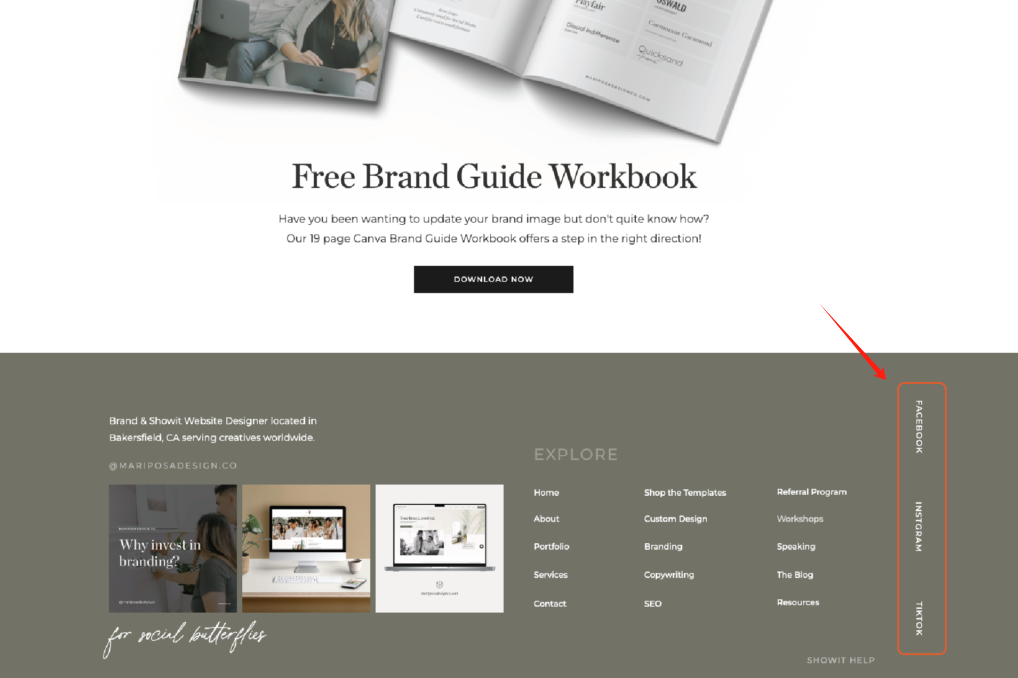
Your About page is another good location. Visitors who make it to your About page are already interested in learning more about you. Adding social media links there gives them the next step to follow your journey.
Blog posts or articles should also include sharing options. Even if you have your main social links in the header, adding share buttons at the end of a post encourages readers to share that specific piece of content. That is a different goal than getting followers, but both matter.
Your email signature is often overlooked but highly effective. Every email you send is an opportunity for someone to connect with you on social media. Adding a few icons or text links in your signature costs nothing and reaches people who already know you.
Tips for Managing Multiple Social Media Links
Once you have several platforms, managing all those social media links can become messy. You might have a link for Instagram, one for LinkedIn, one for YouTube, and so on. Sharing them individually takes up space and can confuse your audience.
1. Use a Link-in-Bio Tool
A link-in-bio tool solves this problem. Instead of listing five different links, you create one single link that leads to a page with all your social media links and any other important content. Services like Linktree and Biovelt let you build a simple landing page with buttons for each platform. This is especially useful for Instagram, where you only get one clickable link in your bio.
2. Keep Your Usernames Consistent
Another best practice is to use consistent usernames across platforms. If your handle is the same on Instagram, X, LinkedIn, and TikTok, people can find you more easily, even without clicking a link. Consistency also looks more professional. It reduces confusion and makes your brand easier to remember.
3. Regularly Audit and Update Your Links
Keep your links updated. If you change your YouTube channel name or switch to a new platform, update your links everywhere. Broken links or outdated profiles create a bad impression. Set a reminder to check your social media links every few months. An audit also helps you remove platforms you no longer use, keeping your profile clean and focused.
4. Prioritize Based on Audience Activity
Not every platform deserves a spot on your main link page. Focus on the platforms where your audience actually engages. If your LinkedIn drives business leads but your TikTok gets little traction, prioritize LinkedIn. You can always rotate links based on current campaigns or seasonal content.
5 Social Media Link Management Tools to Drive Traffic
Managing social media links manually works when you have two or three platforms. Once you grow beyond that, using a tool saves time and gives you better data. Here are five tools that help you organize, share, and track your links.
1. Biovelt
Biovelt is a completely free personal branding tool designed to help you manage all your social media links in one place. Unlike many alternatives that cap the number of links or charge for basic features, Biovelt allows you to add an unlimited number of links. You can choose from a variety of themes to build a personalized homepage that reflects your brand identity.
It also includes link tracking, so you can see real-time click counts for every link you share. That data helps you understand what your audience actually engages with.
2. Linktree
Linktree is one of the most popular link-in-bio tools. You create one link that leads to a customizable page with all your social media links and other important content. The free version includes basic analytics, and paid plans add more customization. It works well for creators who want a simple, no-fuss setup.
3. Beacons
Beacons combines link management with additional features like email capture, product showcasing, and media kit creation. It is built for creators who need more than just links. The free tier offers generous features, and the interface is easy to use.
4. Lnk.Bio
Lnk.Bio keeps things straightforward. You add your links, and it gives you a clean, simple page. It has been around for years and offers both free and paid options. The simplicity appeals to users who just want something that works without extra complexity.
5. Campsite
Campsite focuses on link management with a clean design and good analytics. It also allows you to create a mini landing page with context about each link, which can help explain why someone should click. Free and paid plans are available.
Each of these tools helps you turn a collection of social media links into a single, shareable destination. They also give you data on clicks, which helps you understand what your audience actually engages with.
How Social Media Links Impact SEO and Traffic
The connection between social media links and SEO is not always obvious. Google has stated that social signals are not a direct ranking factor. That means getting a thousand likes on an Instagram post will not automatically move your website up in search results.
However, the indirect effects are real. When you share your website content on social media, you increase its visibility. More visibility means more chances for people to see it, link to it from their own content, or share it further. Those backlinks from other websites do help your SEO.
Your social media profiles themselves also rank in Google. Search for almost any brand, and you will see their Instagram, LinkedIn, and Facebook pages appear in the results. When you control those profiles and keep them updated, you take up more space in search results for your brand name. That makes it harder for negative or unrelated content to show up first.
Social media links also drive referral traffic. When someone clicks a link in your Instagram bio or a tweet and lands on your site, that traffic shows up in your analytics. If that visitor stays on your site, reads multiple pages, or comes back later, those are positive signals that search engines notice over time.
Another factor is brand search volume. The more visible you are on social media, the more people search for your brand name directly. Increased branded search volume tells search engines that your brand has authority and relevance.
FAQs about Social Media Links
Where can I find my social media profile links?
Most social platforms make it easy to copy your profile link. On Instagram and TikTok, go to your profile in a web browser and copy the URL from the address bar. On LinkedIn, go to your profile and look for the "Edit public profile & URL" option. On X, click your profile and copy the link from the browser. For platforms that are primarily mobile apps, you may need to use the share option to copy your profile link.
How many social media links should I include?
Quality over quantity. Include platforms where you are actually active and where your audience engages with you. Five to seven well-maintained profiles are better than fifteen that are rarely updated. Too many links can overwhelm visitors and make your brand look unfocused.
Should I use a link-in-bio tool?
If you use Instagram, TikTok, or any platform that only allows one link in your bio, a link-in-bio tool is very helpful. It turns that single slot into a gateway to all your social media links, your website, products, and other content. Even if your website has unlimited space for links, a link-in-bio tool gives you a clean, mobile-friendly way to share everything in one place.
Do social media links help with SEO?
Indirectly, yes. While social links themselves are not a ranking factor, they drive traffic, increase visibility, and can lead to backlinks. Your social profiles also rank in search results, giving you more visibility for your brand name. Sharing your content on social media gets it in front of more people, which increases the chances of earning organic backlinks.
How often should I update my social media links?
Check your links every few months or whenever you change your handle, switch platforms, or launch something new. Broken links look unprofessional and frustrate visitors. If you use a link-in-bio tool, review it regularly to make sure the most important links are featured prominently.
Can I track clicks on my social media links?
Yes, many tools offer click tracking. Link-in-bio services usually include basic analytics showing how many clicks each link receives. For more detailed tracking, you can use URL shorteners like Bitly or tracking parameters in your links. This data helps you understand which platforms and which links actually drive traffic.
Conclusion on Social Media Links
Social media links might seem like a small detail in your overall online presence, but they play a meaningful role in how people discover, follow, and engage with you. They connect your website to your social profiles, give visitors a way to stay in touch, and indirectly support your SEO efforts over time.
The key is to be intentional. Choose platforms where you are active. Place your links where people can easily find them. Keep them updated. Use tools like link-in-bio services to manage multiple links without cluttering your bio or website. And pay attention to what works, tracking clicks to see which platforms actually drive traffic.
Whether you are a blogger, small business owner, freelancer, or creator, your social media links are part of your digital handshake. They tell visitors that you are real, active, and worth following. When you manage them well, they become one of the easiest ways to grow your audience and strengthen your brand.