
16 Personal Website Ideas for 2026: The Practical Guide
Here are 16 practical personal website ideas for 2026, grouped by professional role — from students to freelancers to developers.
You want to build a personal website. But a common failure pattern emerges: people open a template, stare at the screen for an hour, then close the tab. This article gives you 16 ready-to-use ideas, grouped by who you actually are.
I looked at what ranks on Google for "personal website ideas." Most articles give you the same shallow list: blog, portfolio, resume. That's it. They don't tell you which one fits your situation, or how to avoid building something nobody visits.
This guide is different. No fluff. Just practical stuff you can use.
16 Personal Website Ideas by Professional Category
For Students and Early-Career Professionals

Idea 1: The Course Project Museum
Do not only display the final outcome. Show the development process, including initial requirements, failed attempts, iterations, and reasoning behind each change. Employers evaluate how you think, not only what you produce.
How to implement: Create a timeline or table format. For each project, list: original brief → three failed versions with screenshots or code snippets → final outcome. Add a short reflection column explaining what you learned from each failure.
Idea 2: The Skills Transcript Site
Replace grade listings with verified evidence. Identify five core skills relevant to your target role. For each skill, link directly to a deliverable: a GitHub commit, a writing sample, a Figma file, or a data analysis report.
How to implement: Build a simple two-column page. Left column: skill name. Right column: clickable links to specific artifacts. No descriptions needed. The evidence speaks.
Idea 3: The Learning in Public Log
Publish one short post per week documenting what you are currently learning. Do not over-edit. Focus on clarity and honesty. Employers value curiosity and the ability to explain concepts simply.
How to implement: Use a blog or a "Notes" section. Each post: 150–300 words. Structure: what you learned → why it matters → one question you still have.
For Freelancers and Consultants
Idea 4: The Objection Handler Site
Address client doubts before they are raised. Common objections include: "You are too expensive," "How do I know you are legitimate?" and "What if this does not work?" Place clear answers on your homepage.
How to implement: Create an "Objections" section with three to five expandable FAQ entries. For each objection, write a one-sentence acknowledgment followed by a one-paragraph response with evidence (case study, testimonial, or money-back guarantee statement).
Idea 5: The Client Results Only Page
Remove all non-essential content. Present only measurable outcomes. Examples: "Helped Company A increase conversions by 30%," "Helped Company B save 50 staff hours per month."
How to implement: If you lack client results, document a personal project with the same rigor. Show baseline metrics, your intervention, and final metrics. Label it clearly as a self-initiated project.
Idea 6: The Free Tool Plus Paid Service Model
Build a small, functional tool: a calculator, a template, a checklist, or a scorecard. Offer it for free in exchange for an email address. Follow up with a service pitch.
How to implement: Choose a tool that solves one specific problem for your target client. Build it using a no-code platform (e.g., Tally, Gumroad, Carrd) or a simple script. Add an email capture form before the download link. In your follow-up email, include a case study of your paid service.
Data ownership note: Email addresses collected via third-party platforms (Tally, Gumroad) are stored on their servers, not yours. If you require full control over audience data, use an open-source tool (e.g., Open Form) or a simple backend you host yourself. Otherwise, you are trading ownership for convenience — which is fine as long as you know the trade-off.
Idea 7: The Process-First Site
Show how you work, not only what you have made. Document each stage: research → draft → feedback → revision → delivery.
How to implement: For one featured project, create a five-step visual or text walkthrough. At each step, include a real artifact (email screenshot, mark-up PDF, meeting note). Clients hire predictable processes, not just portfolios.
For Developers and Designers
Idea 8: The Live API Playground
Build an interactive element into your portfolio. Examples: a search box that queries a public API, a color picker, a live markdown editor, or a small data visualization.
How to implement: Use vanilla JavaScript or a lightweight framework. Deploy the tool directly on your portfolio page. Add a short code annotation showing how the API call is structured.
Idea 9: The Terminal-Style Portfolio
Use a command-line interface aesthetic for your personal website. This approach is unusual and tends to generate social sharing among technical audiences.
How to implement: Use a library such as Termynal or write custom CSS that mimics terminal output. Keep the content minimal: > about, > work, > contact as commands that reveal hidden sections.
Idea 10: The Digital Garden with a Now Page
Publish short, interconnected notes instead of long-form blog posts. Add a "Now" page that states your current focus area. Update the Now page monthly.
How to implement: Use a digital garden tool (e.g., Obsidian Publish, Dendron, or a simple wiki-style folder structure). The Now page should contain three to five bullet points about current projects, learning goals, or professional interests.
For Writers and Creators
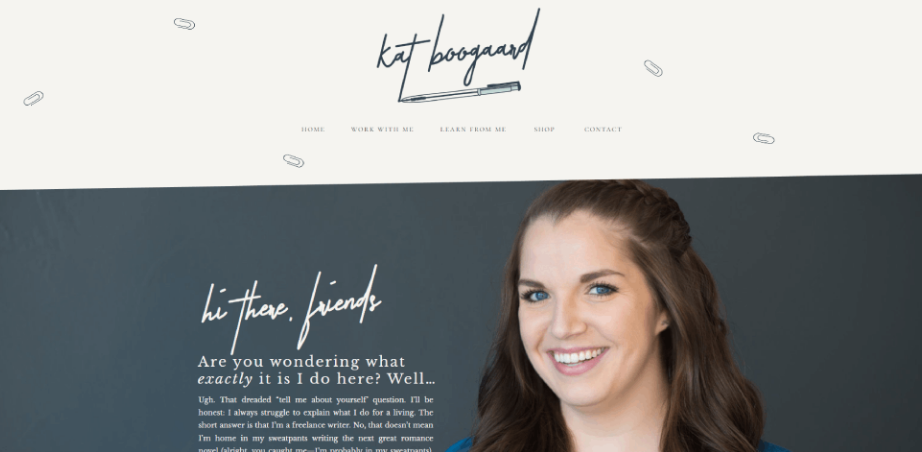
Idea 11: The Longform-First Site
Set your homepage to display your three best articles with full summaries. Include one prominent subscribe button. Remove sidebars, related posts widgets, and social media feeds.
How to implement: Use a minimal theme from Ghost, Medium, or WordPress. The homepage should contain no more than three links, all pointing to full articles.
Idea 12: The Best Of Archive
Curate only your top five pieces of work. Do not display chronological archives or category filters. Quality over quantity.
How to implement: Create a page titled "Best Of." List five entries. Each entry includes: title, one-sentence summary, and a "Read more" link. Update this page only when a new piece outperforms an existing one.
Idea 13: The Newsletter as Homepage
Design your entire website as a landing page for your email newsletter. Use Ghost, ConvertKit, or Substack. Every visitor is encouraged to subscribe.
How to implement: The homepage should contain: a value proposition (what subscribers receive), a sample issue preview, a single email input field, and a testimonial from one existing subscriber. Remove all other navigation.
For Non-Traditional Roles (Sales, Product Management, Operations)
Idea 14: The FAQ About Me Page
Write the ten questions recruiters most frequently ask. Answer each in Q&A format. This structure is easier to scan than a narrative bio.
How to implement: Review your last three interview processes. Extract the recurring questions. For each, write a one-sentence question and a two-to-three sentence answer. Include metrics where possible.
Idea 15: The Toolkit Page
List the software, templates, and workflows you actually use. For each tool, state the specific problem it solves and how you configure it.
How to implement: Create a table with three columns: Tool name → Use case → One workflow tip. Share this page on LinkedIn or industry forums. Other professionals will find it useful and may link to it.
Idea 16: The Problem Library
Identify ten common problems in your field. For each, write a short paragraph describing how you have solved it.
How to implement: Draw from real incidents in your work history. Anonymize sensitive details. Each entry should follow: problem description → your diagnostic step → your solution → the outcome.
Tips for Designing a Compelling Personal Website
You don't need to be a designer. You just need to avoid the most common traps.
Start with one question, not a template. Ask yourself: what's the single most important thing a visitor should do? Download your resume? Contact you for freelance work? Read your latest article? Every design decision flows from that answer. If you can't answer it in one sentence, you're not ready to build.
Above the fold matters more than you think. On desktop, "above the fold" means what someone sees without scrolling. On mobile, it's even less. Use that space for your name, what you do, and one clear action button. Everything else can wait below.
Fonts and colors should be boring. This sounds counterintuitive, but it's the best design advice I ever got. Your personality should come from your content and your work, not from Comic Sans or neon pink. Pick one readable font. Pick two colors that don't hurt your eyes. Move on.
Test it on your phone before you launch. Most people build on a laptop then forget to check mobile. Flip that. Design for mobile first. If it looks good on a small screen, it'll look fine on a big one. The reverse is not true.
Navigation should be obvious, not clever. Don't hide your menu behind mysterious icons. Don't use cute labels like "musings" for your blog. Say "Work," "About," "Contact." People don't want to solve a puzzle. They want information.
One more thing before the ideas: if you want a dead-simple way to centralize all your links and track what people actually click, check out Biovelt. It's completely free, lets you add unlimited links, offers multiple themes to match your style, and gives you real-time click tracking. Perfect if you just need a "link in bio" style page without overthinking it.
5 Costly Mistakes That Make You Look Amateur
Mistake #1 – "Welcome to my website" as your H1
That's wasted space. Replace it with "I help [X] achieve [Y] without [Z]." Now visitors know exactly what you do in three seconds.
Mistake #2 – No clear way to contact you above the fold
Add your email as plain text—name [at] domain [dot] com to avoid spam scrapers. And link your LinkedIn. People want options.
Mistake #3 – Missing social preview card
When someone shares your site on Twitter or LinkedIn, it shows up as a blank link. Fix it with Open Graph Generator or Yoast. Takes five minutes.
Mistake #4 – No 404 page
People will land on broken links. Give them a funny message and a button back to your homepage. Turns frustration into a smile.
Mistake #5 – Broken internal links
Run a free scan with Dr Link Checker. Dead links look lazy. And if you're lazy on your own site, why would anyone hire you?
Frequently Asked Questions
Personal website vs portfolio – do I need both?
No. A portfolio is a subset of personal websites. Use ‘portfolio’ in your URL (/portfolio) and page title if your industry (design, art) expects it. Otherwise use ‘work’ or ‘projects’.
Best platform for a personal website in 2026?
Carrd for single pages. Framer for beautiful designs. WordPress for flexibility. Notion + Super for writers. Pick based on how many pages you need and how much maintenance you want to sign up for.
How to write an About Me page that gets you hired?
Three paragraphs. Past achievements (with numbers if you have them). What you do now (one sentence). Where you're going (optional, but humanizing). No life story. No "I was born in..." Nobody cares.
Final Thoughts on Personal Website Ideas
Review the 16 ideas above. Identify the one that matches your current professional situation.
Write down the idea number. Then spend 30 minutes sketching a layout based on the implementation notes provided.
Build what fits your role, not what is popular.